

Email sender#
Introduction#
SFTPPlus can be configured to send emails based on the events generated during file transfer operations. These emails can serve as notifications or alerts.
To configure an event handler which sends emails to an SMTP server, use the type email-sender.
The emails will be sent over SMTP or ESMTP and SFTPPlus will act as an SMTP client.
SMTP server configuration#
SFTPPlus does not act as an SMTP server. In order to send an email, SFTPPlus acts as an email client. It will connect to an SMTP server and make a request for an email delivery. Access to an SMTP server is necessary.
When setting up email notifications, the first step is to configure the Email Client resource.
Inside the resource configuration, you will define the server address and port, as well as authentication credentials.
Any errors related to email delivery are sent by the remote SMTP server to the configured email_from_address. Make sure you have defined a valid email, in order to receive delivery related errors.
Set up the notification rules#
An event handler of type Send as email is used to define the conditions under which the email notification is sent.
While SFTPPlus performs various operations it will generate a set of events. Each event has an ID and a set of associated attributes, like user name, remote IP address or a file path.
We have created a dedicated article which discusses the details of filtering the event. Consult that page to find out more about the available filtering rules.
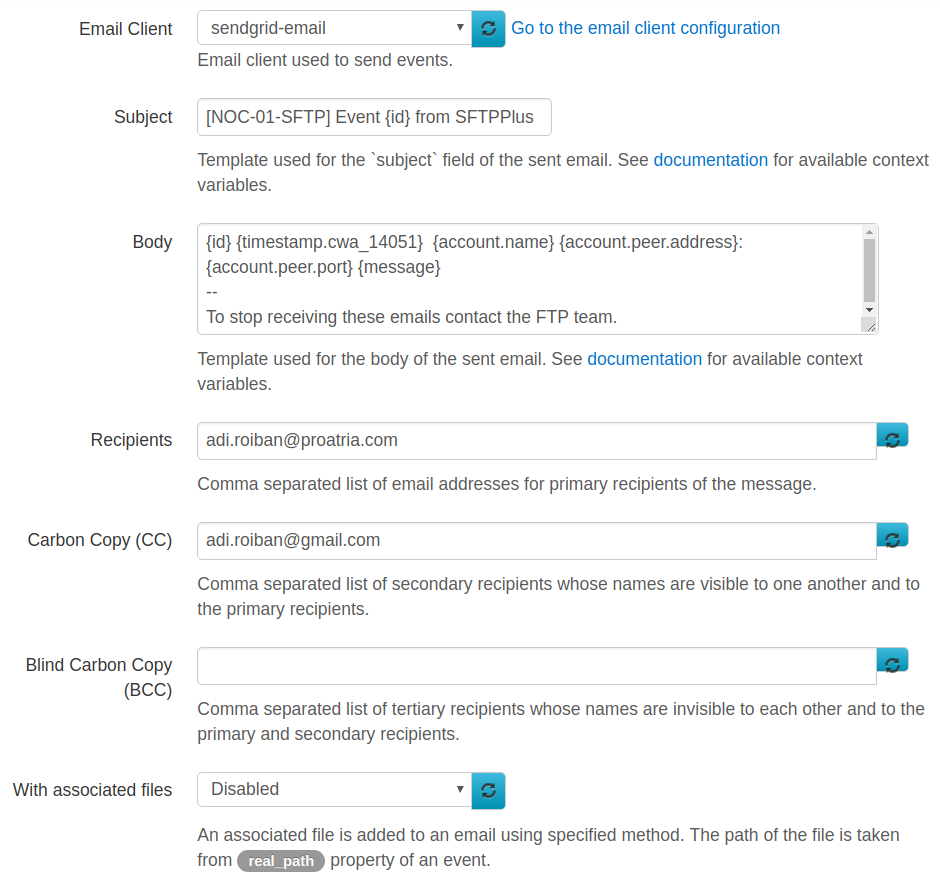
Once the conditions upon which the emails notification should be sent are set (inside the event handler's configuration page), you have the option to define the recipients for each notification, email subject and body.
Below is a screenshot demonstrating some of the configuration options.
Email subject, recipients, or body template#
When configuring the email_to_recipients, email_cc, email_bcc, email_subject, or email_body options, you can defined them as a fixed value or as a template.
The template value is resolved based on the content of the emitted event.
The templates can be defined using the following structure.
The overall structure of the event object is presented below.
The following variables (case-insensitive) are provided as context data containing information about the event being triggered:
id
uuid
message
account.name
account.email
account.peer.address
account.peer.port
account.peer.protocol
account.peer.family
account.uuid
component.name
component.type
component.uuid
server.name
server.uuid
data.DATA_MEMBER_NAME
data_json
timestamp.cwa_14051
timestamp.iso_8601
timestamp.iso_8601_fractional
timestamp.iso_8601_local
timestamp.iso_8601_basic
timestamp.iso_8601_compact
timestamp.timestamp
timestamp.year_decimal
timestamp.year_no_century
timestamp.month_decimal
timestamp.month_padded
timestamp.day_padded
timestamp.day_decimal
timestamp.day_of_year_padded
timestamp.hour_padded_24
timestamp.hour_decimal_24
timestamp.hour_padded_12
timestamp.hour_decimal_12
timestamp.hour_am_pm
timestamp.minute_padded
timestamp.minute_decimal
timestamp.second_padded
timestamp.second_decimal
DATA_MEMBER_NAME can be any of the supported data attributes specific to each event ID. You can discover the available data attributes as part of the Events reference documentation or the Web Manager Activity log.
The members of data are specific to each event. See Events page for more details regarding the data available for each event.
Many events have data.path and data.real_path, together with the associated data.file_name, data.directory_name, data.real_file_name, and data.real_directory_name.
Below is the description for the main members of the event object.
- name:
id
- type:
string
- optional:
No
- description:
ID of this event. See Events page for the list of all available events.
- name:
message
- type:
string
- optional:
No
- description:
A human readable description of this event.
The timestmap contains the following attributes:
- name:
timestamp
- type:
string
- optional:
No
- description:
Date and time at which this event was created, as Unix timestamp with milliseconds.
- name:
cwa_14051
- type:
string
- optional:
No
- description:
Date and time in CWA 14051 at which this event was emitted.
The account contains the following attributes:
- name:
uuid
- type:
string
- optional:
No
- description:
UUID of the account emitting this event. In case no account is associated with the event, this will be the special process account. In case the associated account is not yet authenticated this will be the special peer account.
- name:
name
- type:
string
- optional:
No
- description:
Name of the account emitting this event.
- name:
email
- type:
string
- optional:
yes
- description:
The primary email, as text associated to this account.
- name:
emails
- type:
string
- optional:
yes
- description:
A list of 2 value tuples (name, email) for the emails associated to this account.
- name:
token
- type:
string
- optional:
Yes
- description:
For Windows local or domain accounts a token that can be use to impersonate the account. For Azure AD accounts, when extra api_scopes are configured, this is the latest OAuth2 token that can be use to obtain access to an extra API or refresh a token.
- name:
peer
- type:
JSON Object
- optional:
No
- description:
Address of the peer attached to this account. This might be a local or remote address, depending on whether the account is used for client side or server side interaction.
The peer contains the following attributes:
- name:
address
- type:
string
- optional:
No
- description:
IP address of this connection.
- name:
port
- type:
integer
- optional:
No
- description:
Port number of this connection.
- name:
protocol
- type:
string
- optional:
No
- description:
OSI Layer 4 transport layer protocol used for this connection in the form of either TCP or UDP.
The component contains the following attributes:
- name:
uuid
- type:
string
- optional:
No
- description:
UUID of the component (service or transfer) emitting this event.
- name:
type
- type:
string
- optional:
No
- description:
Type of the component emitting this event.
The server contains the following attributes:
- name:
uuid
- type:
string
- optional:
No
- description:
UUID of the server emitting this event.
- name:
type
- type:
string
- optional:
No
- description:
Type of the server emitting this event.
Send emails to accounts using the configured emails#
When configuring a user account in SFTPPlus, you can define one or more email addresses associated to this account.
When configuring an email handler for an action triggered by a user account, you can configure that event handler to use the email address associated to the user.
A template can be used to generate the email address based on the values found in the event. For example, {account.email} is replaced with the primary email address configured for an account.
The template can combine variable values with fixed values. For example, {account.name}@example.com for an event triggered by user john-d will generate the email address john-d@example.com. If the event data is an UUID, it is resolved to an account email or all the emails from the group. If the resulting value is empty, the email message is skipped.
The following configuration options have support for expanding the email address based on the account configuration:
email_to_recipients
email_cc
email_bcc
Below, you can find a few configuration examples. These example are based on the following group and accounts configuration:
[groups/215cbf00-b12e-4708-8669-b8089c5009b9]
name = Sales team

[accounts/9cf8e8f1-1cd0-42e1-8135-858c35d52a8f]
name = John D
email = john.d@email.com
group = 215cbf00-b12e-4708-8669-b8089c5009b9

[accounts/9215cbf00-b12e-4708-8669-b8089c5009b9]
name = Jane R
email = jane.r@email.com, admins@example.net
group = 215cbf00-b12e-4708-8669-b8089c5009b9
You can configure an event handled to send an email to any member of a group. This is done using a configuration similar to the one below, where 215cbf00-b12e-4708-8669-b8089c5009b9 is the unique ID of the group. This sends emails to john.d@email.com, jane.r@email.com, admins@example.net:
[event-handlers/6d51ed1e-35ec-41d7-8b51-53e56c716212]
enabled = True
type = email-sender
name = Send to all emails of all users from the group, for any file upload.
target = 40007
email_to_recipients = 215cbf00-b12e-4708-8669-b8089c5009b9
You can configure an email notification to send emails to the primary email of each user. The configuration below exemplifies this. A file uploaded by user John D sends a notification to john.d@email.com. A file uploaded by user Jane R sends a notification to jane.r@email.com. Below is the example for the event handler configuration:
[event-handlers/6d51ed1e-35ec-41d7-8b51-53e56c716212]
enabled = True
type = email-sender
name = Send to primary email of the user that has uploaded the file.
target = 40007
email_to_recipients = {account.email}
You can also configure the email notification to send emails to all emails associated to an account, not only the primary email. The configuration below exemplifies this. A file uploaded by user John D sends a notification to john.d@email.com. A file uploaded by user Jane R sends a notification to jane.r@email.com and admins@example.net. Below is the example for the event handler configuration:
[event-handlers/6d51ed1e-35ec-41d7-8b51-53e56c716212]
enabled = True
type = email-sender
name = Send to any email of the user that has uploaded the file.
target = 40007
email_to_recipients = {account.uuid}
Reports over email#
Emails sent by SFTPPlus can have an attached file. The attached file is the same as the file associated with the event which has triggered the email.
Combined with the 'Store in local file' event handler you can set up a system in which certain events are stored in a separate local file. The separate local file can be rotated daily and an 'Send as email' event handler associated with the event generated during the file rotation and have the rotated file attached to the email.
In this way, you can receive daily reports over email containing only the selected events.
Amazon SES Simple Mail Transfer Protocol (SMTP) interface#
SFTPPlus can use Amazon SES to send emails.
The Connecting to the Amazon SES SMTP Endpoint guide from Amazon provides the DNS names for the SMTP server which can be configured inside the SFTPPlus 'Email client' resource.
As noted in the Amazon guide, Amazon Elastic Compute Cloud (Amazon EC2) throttles email traffic over port 25 by default. To avoid timeouts when sending email through the SMTP endpoint from EC2, use port 587.
If you want to use port 25, you need to fill out a Request to Remove Email Sending Limitations to remove the throttle.
Configuration options#
Below you can find all the configuration options available for the email sender event handler.
name#
- Default value:
''
- Optional:
No
- From version:
2.10.0
- Values:
Any text.
- Description:
Human-readable short text used to identify this event handler.
cluster_activation#
- Default value:
'all'
- Optional:
No
- From version:
5.13.0
- Values:
all
controller
node
Node UUID
- Description:
When clustering is enabled, it determines on which SFTPPlus instance this component is enabled.
When configured with all, it will be active on any SFTPPlus instance, including the controller and all nodes.
When configured with controller, it will only be active on the SFTPPlus controller instance.
When configured with node, it will be active on all SFTPPlus node instances.
You can configure it with the UUID of a node, to make it active only on that particular node instance.
Note
The enabled configuration is not ignored. When configured with enabled = No this will not be active, regardless of the cluster_activation configuration.
description#
- Default value:
''
- Optional:
Yes
- From version:
2.10.0
- Values:
Any text.
- Description:
Human-readable text that describes the purpose of this event handler.
type#
- Default value:
''
- Optional:
No
- From version:
2.10.0
- Values:
file-dispatcher - Dispatch a file into one or multiple paths.
http - HTTP POST request (unsecured).
local-file - Append events to a file located on the local file system.
email-sender - Send emails as an SMTP client.
windows-eventlog - Send events to Windows EventLog Service.
standard-stream - Send events to standard output.
syslog - Local Unix socket or remote IP:PORT address for Syslog.
create-archive - Create/Compresses one or more files.
extract-archive - Extract/Uncompressed a file.
external-executable - Execute an external script or program.
openpgp - Encrypt/Decrypt files using OpenPGP.
rabbitmq - Publish event to RabbitMQ AMQP 0-9-1 server.
extension - For custom event handlers implemented using our API.
- Description:
This option specifies the type of the event handler. Each type has a set of specific configuration options.
target#
- Default value:
''
- Optional:
Yes
- Values:
Comma separated list of event ids.
Comma separated list of event ids starting with an exclamation mark.
Leave empty to handle all events.
- From version:
2.10.0
- Description:
Define a comma separated list of event ids to have the event handler triggered only for those events.
When you want to have it triggered for all the events, excepting a few events you should prefix each event id with the exclamation mark (!).
Leave it empty to handle all events.
Note
Combining the two methods is not supported as the same result can be achieved by allowing only the desired events, all the others will be ignored.
groups#
- Default value:
''
- Optional:
Yes
- Values:
Comma separated list of event groups.
Comma separated list of event groups starting with an exclamation mark.
Empty.
- From version:
3.39.0
- Description:
Defines the list of event groups for which this handler is active.
When you want to handle all the events, except for the ones from a set of groups, prefix the group names with the exclamation mark (!).
An event can be a member of one or multiple groups. The event is handled if any of its groups is found in the list of configured allowed groups. The event is not handled if any of its groups is found in the list of configured ignored groups (starting with !).
Leave it empty to handle events from all groups.
user_groups#
- Default value:
''
- Optional:
Yes
- Values:
Comma separated list of group or role UUIDs.
Empty.
- From version:
5.25.0
- Description:
Defines the list of avatar group or role UUIDs for which this handler is active.
For end-user events this matches the account's associated groups. For manager events this matches the administrator's associated roles.
When you want to handle all the events except for a set of groups or roles, prefix each UUID with the exclamation mark (!).
The event is handled if any of the avatar UUIDs is found in the list of configured allowed UUIDs. The event is not handled if any of the avatar UUIDs is found in the list of configured ignored UUIDs.
Leave it empty to handle events from any avatar groups or roles.
usernames#
- Default value:
''
- Optional:
Yes
- Values:
Comma separated list of usernames.
Comma separated list of usernames starting with an exclamation mark.
Leave empty to handle all events.
- From version:
3.9.0
- Description:
Comma separated list of usernames whose events are handled by this event handler. A username can include OS accounts, application accounts, and any accounts accepted by any authentication method including external HTTP accounts.
When you want to have it triggered for all the events, excepting a few events you should prefix each username with the exclamation mark (!).
Leave it empty to handle events from any users or events which are not associated with any user.
components#
- Default value:
''
- Optional:
Yes
- Values:
Comma separated list of UUIDs.
Comma separated list of UUIDs starting with an exclamation mark.
Leave empty to handle all events.
- From version:
3.18.0
- Description:
Comma separated list of component UUIDs for which events are handled by this event handler.
When you want to have it triggered for all the events, excepting a few events you should prefix each UUID with the exclamation mark (!).
Leave it empty to handle events emitted by any component.
servers#
- Default value:
empty
- Optional:
Yes
- From version:
5.13.0
- Values:
UUID of an SFTPPlus servers
Comma-separated list of UUIDs
all
- Description:
This is designed to be used with SFTPPlus cluster deployments.
When configured it will handle events from particular SFTPPlus servers.
When left empty, it will only handle events emitted by the local SFTPPlus server.
When set to all, it will handle events from all SFTPPlus servers.
It can be configured with one or multiple SFTPPlus server UUIDs.
source_addresses#
- Default value:
Empty
- Optional:
Yes
- Values:
Comma separated list of IP addresses.
List of IP addresses starting with an exclamation mark.
Empty.
- From version:
3.40.0
- Description:
Comma separated list of source IP addresses of the remote peers, which are handled by this event handler.
When you want to have it triggered for all the addresses, excepting a few addresses you should prefix each address with the exclamation mark (!).
Leave it empty to handle events emitted by any source address.
data_filter#
- Default value:
''
- Optional:
Yes
- Values:
Comma-separated list of data member names and filter expressions.
Multiple expressions, one per line (Since 4.29.0)
Leave empty to handle all events.
- From version:
3.22.0
- Description:
Comma separated definition with the name of attribute data member and the targeted matching expression.
Data member names are configured with insensitive cases.
For more details about the available expressions see the matching expression documentation.
The following example will extract the value to be matched/filtered from the path data member of the event. The extracted value is then matched against the
*/folderA/*globbing expression:[event-handlers/b904ed23-a234-4ccf-8abd-edcae4d3324f] data_filter = path, */folderA/*
See the usage instructions for more operational details.
You can filter based on multiple data members using multiple rules. Each rule is defined on a separate line.
In the following example, events are triggered only if they are uploaded into the directory named
reports-Awith a size of 0 bytes (empty file):[event-handlers/b904ed23-a234-4ccf-8abd-edcae4d3324f] data_filter = path, */reports-A/* size, 0
Leave this configuration empty to not filter based on the event's attached data, and handle events regardless of their data attributes.
fail_after_errors#
- Default value:
10
- Optional:
Yes
- From version:
3.0.0
- Values:
An integer number greater than 0.
0 Disabled.
- Description:
Number of consecutive errors after which the event handler will automatically stop with a failed state.
Setting this to 0 will disable the feature. The event handler will no longer stop regardless of the number of errors encountered.
email_to_recipients#
- Default value:
''
- Optional:
Yes
- Values:
Email address
UUID of a group (Since 4.25.0)
UUID of an account (Since 4.25.0)
Event-based template (Since 4.25.0)
Comma-separated list of emails
Comma-separated list of emails, group UUIDs, account UUIDs or templates. (Since 4.25.0)
- From version:
3.4.0
- Description:
Comma-separated list of addresses where to send emails.
If this list is not defined, emails will be sent using the general email resource recipients configuration.
The list can also be configured using UUIDs of accounts and groups. For an account uuid, the email is sent to the address configured for that account. For a group uuid, the email is sent to all the users from the group that have an email address configured. If the account has no email address configured, the email message is skipped. (Since 4.25.0)
A template can be used to generate the email address, based on the values found in the event. For example, {account.email} is replaced with the primary email address configured for an account.
email_cc#
- Default value:
''
- Optional:
Yes
- Values:
Email address
UUID of a group (Since 4.25.0)
UUID of an account (Since 4.25.0)
Event-based template (Since 4.25.0)
Comma-separated list of emails
Comma-separated list of emails, group UUIDs, account UUIDs or templates. (Since 4.25.0)
- From version:
3.44.0
- Description:
Comma-separated list of secondary recipients whose names are visible to one another and to the primary recipients.
Leave it empty to not use CC.
email_bcc#
- Default value:
''
- Optional:
Yes
- Values:
Email address
UUID of a group (Since 4.25.0)
UUID of an account (Since 4.25.0)
Event-based template (Since 4.25.0)
Comma-separated list of emails
Comma-separated list of emails, group UUIDs, account UUIDs or templates. (Since 4.25.0)
- From version:
3.44.0
- Description:
Comma-separated list of tertiary recipients whose names are invisible to each other and to the primary and secondary recipients.
Leave it empty to not use BCC.
email_associated_files#
- Default value:
Empty
- Optional:
Yes
- Values:
Empty
attachment.
- From version:
3.18.0
- Description:
When set to attachment, an email (as multi-part MIME) is sent with the associated file as an attachment. The file path is taken from the real_path property of an event data.
The maximum allowed file size equals to 5MB. If the file can't be attached or is larger than 5MB, then the email is not sent and an audit event is created for this failure.
When set to the empty value, an email is sent without an attachment.
email_subject#
- Default value:
[{id}] [{component.name}] New event from SFTPPlus- Optional:
No
- Values:
Plain text template
- From version:
3.4.0
- Description:
Template used for the subject field of the sent email.
The email_subject can be configured using a format string like
New Event {id} from {account.name}.The following variables (case-insensitive) are provided as context data containing information about the event being triggered:
id
uuid
message
account.name
account.email
account.peer.address
account.peer.port
account.peer.protocol
account.peer.family
account.uuid
component.name
component.type
component.uuid
server.name
server.uuid
data.DATA_MEMBER_NAME
data_json
timestamp.cwa_14051
timestamp.iso_8601
timestamp.iso_8601_fractional
timestamp.iso_8601_local
timestamp.iso_8601_basic
timestamp.iso_8601_compact
timestamp.timestamp
timestamp.year_decimal
timestamp.year_no_century
timestamp.month_decimal
timestamp.month_padded
timestamp.day_padded
timestamp.day_decimal
timestamp.day_of_year_padded
timestamp.hour_padded_24
timestamp.hour_decimal_24
timestamp.hour_padded_12
timestamp.hour_decimal_12
timestamp.hour_am_pm
timestamp.minute_padded
timestamp.minute_decimal
timestamp.second_padded
timestamp.second_decimal
DATA_MEMBER_NAME can be any of the supported data attributes specific to each event ID. You can discover the available data attributes as part of the Events reference documentation or the Web Manager Activity log.
handler.name
handler.uuid
email_body#
- Default value:
[{timestamp.cwa_14051}] {message}{LF}{LF}{data_json}- Optional:
Yes
- Values:
Plain text with newline as the only non-printable characters.
- From version:
3.18.0
- Description:
Template used for the body of the sent email.
The following variables (case-insensitive) are provided as context data containing information about the event being triggered:
id
uuid
message
account.name
account.email
account.peer.address
account.peer.port
account.peer.protocol
account.peer.family
account.uuid
component.name
component.type
component.uuid
server.name
server.uuid
data.DATA_MEMBER_NAME
data_json
timestamp.cwa_14051
timestamp.iso_8601
timestamp.iso_8601_fractional
timestamp.iso_8601_local
timestamp.iso_8601_basic
timestamp.iso_8601_compact
timestamp.timestamp
timestamp.year_decimal
timestamp.year_no_century
timestamp.month_decimal
timestamp.month_padded
timestamp.day_padded
timestamp.day_decimal
timestamp.day_of_year_padded
timestamp.hour_padded_24
timestamp.hour_decimal_24
timestamp.hour_padded_12
timestamp.hour_decimal_12
timestamp.hour_am_pm
timestamp.minute_padded
timestamp.minute_decimal
timestamp.second_padded
timestamp.second_decimal
DATA_MEMBER_NAME can be any of the supported data attributes specific to each event ID. You can discover the available data attributes as part of the Events reference documentation or the Web Manager Activity log.
handler.name
handler.uuid
Using these variables the email_body can be configured, for example, like the following:
[event-handlers/b9787c72-2c8b-4725-a049-ee628aa0abc1]
email_body = {id} {message}
  Content over multiple lines

  Event attached data:
  {data_json}